

2·
3 months agoMint and US Mobile are both good alternatives to Fi. US Mobile is a bit more flexible since you can use any of the major US carriers.
Mint and US Mobile are both good alternatives to Fi. US Mobile is a bit more flexible since you can use any of the major US carriers.
I have been using the Alpha for almost 6 months. Overall it has been a very positive experience. Even in Alpha, it worked better out of the box on my laptop than Fedora and Bazzite. Especially the printer support and multi-monitor support.

I can confirm this is all true. I read about it on Fox and MSNBC. You know it must be true when they both agree!

That may have been true a few years ago but not anymore. Google gets lots of hate on Lemmy, Reddit, and various other tech sites.
For a few years, even the FBI officially recommended that everyone should use an adblocker. They recently removed that PSA from their website, I believe with the new administration:
https://techcrunch.com/2022/12/22/fbi-ad-blocker/
https://www.pcmag.com/news/fbi-recommends-installing-an-ad-blocker-to-dodge-scammers
I am very familiar/comfortable with Windows and very confused by MacOS. Yet I much prefer Gnome over Plasma.
Not to say you are wrong or anything, maybe I’m just an outlier.
That said, I’ve been using Cosmic DE for about the past month and it’s pretty great. I think I might stick with it. Gotta love all the options we have!
Thanks for these, especially the “we’re not going anywhere” link. I was hesitant to switch because I was worried about future support on my Pixel 7. Here’s the full quote for anyone that didn’t check the above link:
Many companies and individuals are trying to mislead people about the future of GrapheneOS to promote their insecure products and services. GrapheneOS is not going anywhere. We’ve made it clear we’re shipping Android 16 soon and that the supported devices will remain supported.

I’ve been exclusively gaming on my Steam Deck since launch and have a slightly different experience. For me, if the game is certified “Playable” or “Verified” on the Steam page, I just download and play it. I have never once tweaked any settings or tried a different version of Proton. I’m sure there are tweaks that can achieve better performance on certain games, but I have never personally felt the need to research that on any game.
For reference, below are my recently played games. All but Trials worked great for me. Trials is marked “Unplayable” on Steam, though I did get it to work for a few hours before it broke.

I have used FF based browsers for a long time and still do. I recently saw this from the GrapheneOS developers, which kinda freaks me out and has me considering switching to a Chromium based browser:
https://grapheneos.org/usage#web-browsing
Chromium-based browsers like Vanadium provide the strongest sandbox implementation, leagues ahead of the alternatives. It is much harder to escape from the sandbox and it provides much more than acting as a barrier to compromising the rest of the OS. Site isolation enforces security boundaries around each site using the sandbox by placing each site into an isolated sandbox… Browsers without site isolation are very vulnerable to attacks like Spectre…
Avoid Gecko-based browsers like Firefox as they’re currently much more vulnerable to exploitation and inherently add a huge amount of attack surface. Gecko doesn’t have a WebView implementation (GeckoView is not a WebView implementation), so it has to be used alongside the Chromium-based WebView rather than instead of Chromium, which means having the remote attack surface of two separate browser engines instead of only one. Firefox / Gecko also bypass or cripple a fair bit of the upstream and GrapheneOS hardening work for apps. Worst of all, Firefox does not have internal sandboxing on Android. This is despite the fact that Chromium semantic sandbox layer on Android is implemented via the OS
isolatedProcessfeature, which is a very easy to use boolean property for app service processes to provide strong isolation with only the ability to communicate with the app running them via the standard service API. Even in the desktop version, Firefox’s sandbox is still substantially weaker (especially on Linux) and lacks full support for isolating sites from each other rather than only containing content as a whole. The sandbox has been gradually improving on the desktop but it isn’t happening for their Android browser yet.
EDIT: I really hope Ladybird turns out to be amazing.
I was considering a switch but due to recent policy changes at Google, I’m now concerned about long-term (or even short-term) support for GrapheneOS and other custom ROMs:
I went on the same path. I was surprised how many sites were broken in IronFox.
They make a pretty good keyboard too. It doesn’t have network permissions and is open source and privacy focused.

Inside
Brothers: A Tale of Two Sons
Eternal Strands
Disco Elysium
All very different and unique. All fantastic!
I believe Librawolf defaults to “strict” fingerprinting blocking. Try setting it to moderate and see if that works with your bank
I vote the same, but I’d suggest a uBlue spin of the Fedora Atomic desktops. They have better defaults (all batteries included, as they say) and are easier to use overall IMHO. Bluefin and Bazzite are both great options, and both offer KDE and Gnome variants.
Edit: TIL the KDE version of Bluefin is called Aurora.
BTW, uBlue is getting some big recognition lately. They have been on the Fedora Podcast (official) and Framework Laptops has official instructions on their website for installing Bluefin and Bazzite.
I’m playing through 4 now and I’m amazed at how good it looks. Very well optomized imho. It’s also a lot of fun.
I’ve never played the others but I would be tempted with a Steam release.
I added this edit above. Pasting here in case you are curious. Cheers.
EDIT: This thread motivated me to try and fix this issue. Installing Firefox using rpm-ostree worked. I expected it would, though I am still hoping to figure this out using the Flatpak version at some point. I also tried using Distrobox/Box Buddy to create a Fedora 40 box and install Firefox there. That version of Firefox couldn’t even see my NAS at all (unlike the Flatpak which could see my NAS but couldn’t upload files from the NAS to Proton). This was my first time ever using Distrobox. I thought it was super cool to see it in action and get a working Firefox, even though I couldn’t use it to access my NAS as hoped.
I agree. I installed the rpm-ostree version of FF and it worked as expected.
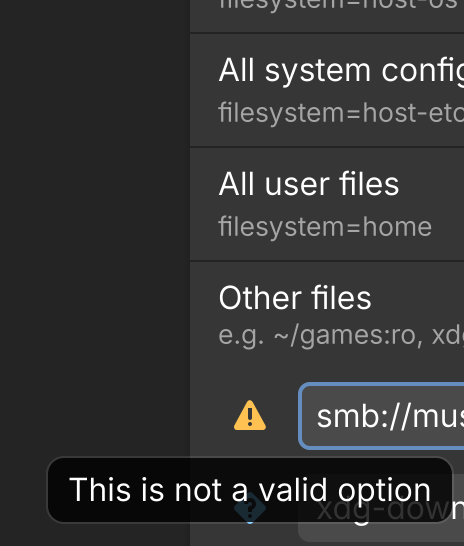
Thanks. I tried that using:
smb://[NAS NAME].local/[FOLDER NAME]/
I copied that path straight out of the Files app. Unfortunately it does not work. There is a yellow exclamation point flag next to it that says “This is not a valid option.”
I ended up installing the rpm-ostree version of Firefox, which accesses my Nas just fine for proton drive uploads. I do hope to eventually figure out how to do this with flatpak/flatseal, but this works for now at least. I appreciate the help!
I switched to Niagara a few years ago when Nova was sold. True game changer once you get used to it (which doesn’t take too long). It works great on phone or tablet. And there is still something SO satisfying about watching the alphabet and apps move with your thumb. It’s so smooth and the haptic feedback is perfect (running on Pixel 7, GrapheneOS, and a cheap old Samsung tablet A8).
Random video showing the UI within the first minute:
https://youtu.be/sh6q5bjcaXQ